

%20(1).png)
July 2026 Product Update

by: Riley Ellwanger, Senior Software Engineer
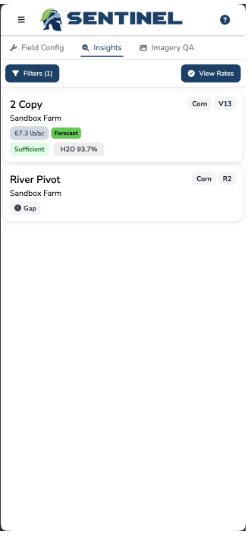
New Mobile Home Page
See everything you need to make critical in-season decisions, right from your phone.
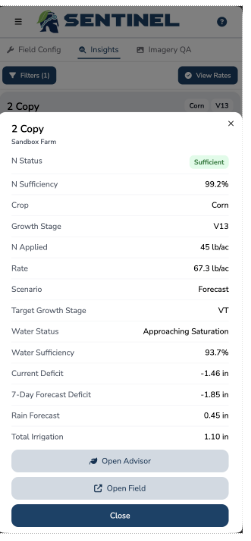
Field Config and Insights are all one tap away at the top. We switched the Insights view to cards — each field shows its current N rate, status, and growth stage right up front, with a current N status. Tap any card and you get the full picture — N sufficiency, water status, applied rate, scenario, and quick links to jump straight into the Advisor or the field. Whether you're checking Insights from the field or pulling up an Advisor rate between stops, it's just faster.
Growing Season Groundwork
A lot of this month's product work is behind the scenes — keeping Account Managers and CSPs moving and making the right calls.
In a way, we practice agile agronomy ourselves — learning from early-season performance in our warmer regions and folding those insights back in before the Midwest hits the same growth stages. We're dialing in the algorithms behind N-Time® Insights and fine-tuning the All-N™ Advisor to give more precise rate recommendations when crop demand peaks. (We've also looked at a genuinely unreasonable number of graphs this month. The team is fine.)
We also deployed a new cloud detection model that filters out cloudy pixels and routes the clear ones through — so even a partially cloudy image can still deliver insights from its clean segments. It runs on every image automatically, so what you're seeing is always based on the best data available. We’ll still show the cloudy images so you know they’re coming through as they should, we just won’t make recommendations on them.


Comments